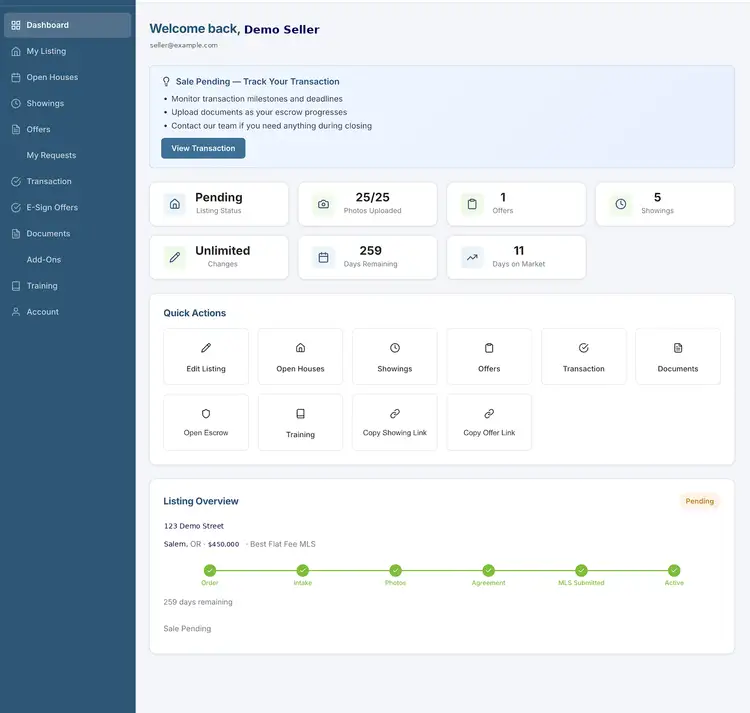
Your whole sale, in one place.
Seller HQ™ opens the moment you order. It tells you exactly what to do next to get live on the MLS, then runs your showings, offers and closing.
Brokered by RealtyNet LLC, a licensed Oregon real estate brokerage Unlimited free price and status changes
Get listed
A guide at the top of Seller HQ™ always shows your next step. Here's the path from order to live listing.
- 1
Order your package
Choose a package and check out. Seller HQ™ is set up for you automatically.
You - 2
Complete your intake form
Seller HQ™ opens the right form for your county and MLS. You can pre-fill it from a PDF or a listing link, and save and come back any time.
You - 3
Upload your photos
Drag and drop, then reorder. Your package sets how many photos you can use.
You - 4
Sign your listing agreement
Sign online with a typed or drawn signature. Co-sellers can sign too.
You - 5
We build your MLS draft
Your broker enters the listing in the MLS and posts the MLS draft PDF in Seller HQ™. You get a notification to review it.
Your broker - 6
Review and approve
Read the draft in Seller HQ™ or download it. Approve to go live now, approve with a go-live date, or request corrections. We fix and re-post until it's right.
You - 7
Live on the MLS
We activate your listing within 1–2 business days of approval, and your MLS number appears in Seller HQ™.
Your broker
Sell and close
Once you're active, Seller HQ™ switches to running the sale, from the first showing to closing day.
- 1
Active and marketed
Track days on market, request price and status changes, and copy your showing and offer links. BuyerLink™ sends buyer calls to you, 24/7.
Seller HQ™ - 2
Showings
Agents request times through your link. Approve or decline from a text or email, suggest another time, and set weekly hours and blackout dates.
You - 3
Offers, side by side
Offers arrive through your offer link. Compare price, financing, earnest money, closing date and contingencies with a score, keep every counter, and export a PDF.
You - 4
Pending
When you accept an offer, the listing moves to pending and Seller HQ™ opens your transaction.
You and your broker - 5
Transaction milestones
Earnest money, inspection, appraisal, financing, title and escrow, and closing, with dates, documents and reminders 3 days before each deadline.
Seller HQ™ - 6
Sold and closed
Download your closing packet and full archive in one click.
You
What's included
Every package includes Seller HQ™. Some tools come with higher packages.
| Feature | Included with |
|---|---|
| MLS draft review: approve now, pick a go-live date, or request corrections | Every package |
| Online listing agreement and photo upload | Every package |
| Unlimited free price and status changes | Every package |
| BuyerLink™: buyer calls sent straight to you, 24/7 | Every package |
| Showing requests with approve or decline by text and email | Every Flat Fee package |
| Side-by-side offer comparison with a score and PDF export | Every package |
| Document vault, forms library and one-click closing packet | Every package |
| Co-seller access and alerts | Every package |
| Seller net sheet | Better and up |
| E-sign purchase agreements | $399 packages and up, Agent Assist and Full Service, or as an add-on |
| Open houses posted to the MLS | Included on Best and up; per-posting fee on other packages |
| Transaction milestones and deadline reminders | Best, Premium and Maximum Exposure |
Package details and prices are on Pricing and Flat Fee MLS.
Seller HQ™ questions
What is Seller HQ™?
Seller HQ™ is the seller portal that comes with every package. It guides you through listing your home, then manages showings, offers and the steps to closing.
Do I get Seller HQ™ with the cheapest package?
Yes. Every package includes Seller HQ™, MLS draft review, unlimited free price and status changes, BuyerLink™ and side-by-side offer comparison. Some tools, such as the net sheet and transaction milestones, come with higher packages.
Can I approve my MLS listing before it goes live?
Yes. Your broker posts the MLS draft in Seller HQ™. You can approve it to go live now, approve it with a future go-live date, or request corrections, and we re-post until you approve.
How do showing requests work?
Agents request a time through your showing link. You get a text and an email with one-tap Approve and Decline, can suggest another time, and set weekly hours and blackout dates so double bookings are blocked.
Does accepting an offer in Seller HQ™ sign the contract?
No. Accepting records your decision, notifies the buyer's agent and opens your transaction. You still sign the purchase agreement itself.